> For AI agents: the complete documentation index is available at /llms.txt, the full documentation bundle is available at /llms-full.txt.
# 主题 API
> 适用版本 1.0.0 | 面向主题开发
插件为 Halo 主题提供三种集成方式,按省事程度从高到低排列:
| 方式 | 适用场景 | 需要改主题吗 |
| ----------------- | ------------- | ------ |
| 直接使用插件页面 | 大多数站点 | 否 |
| 覆盖页面模板 | 想改页面结构但保留逻辑 | 是 |
| 引用模态框 / 调用 Finder | 想把打赏能力嵌进自己的页面 | 是 |
## 页面路由
### 打赏页
```
GET /reward
```
- 由插件注册的 `RouterFunction` 渲染,模板名 `reward`
- 自动套用当前主题的页头与页脚(依赖 Halo 2.26.0+ 的 `layout` 契约)
- 插件设置中关闭「启用打赏页面」后返回 404
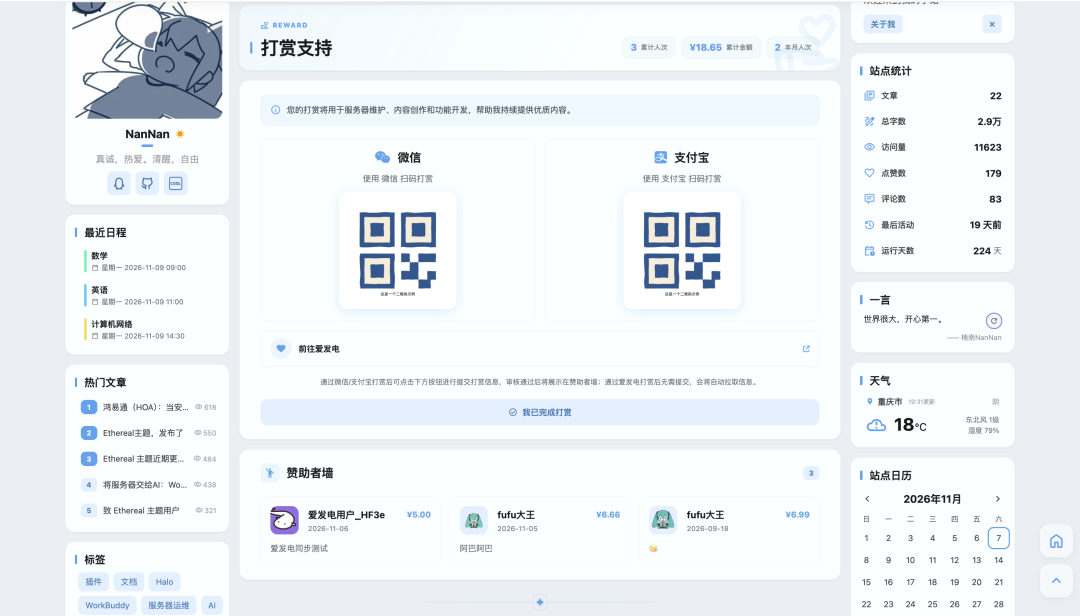
适配效果参考([楠枝小笺](https://www.nanzhiy.cn/reward)):
### 模板覆盖
在主题的 `templates/` 目录下放一个 `reward.html`,插件会自动改用主题模板渲染。
### 模板变量
覆盖模板时可直接使用以下变量(均由插件路由注入):
| 变量 | 类型 | 说明 |
| ---------------------------- | ---------- | ------------------------------ |
| `reward.title` | String | 页面标题 |
| `reward.intro` | String | 页面简介 |
| `reward.currencySymbol` | String | 货币符号 |
| `reward.wechatQr` | String | 微信收款码地址 |
| `reward.alipayQr` | String | 支付宝收款码地址 |
| `reward.paymentTip` | String | 收款提示 |
| `reward.afdianPageUrl` | String | 爱发电主页地址,未启用或未填写时为空串 |
| `reward.enableRecordSubmit` | boolean | 是否允许访客提交 |
| `reward.requireLogin` | boolean | 是否仅登录用户可提交 |
| `reward.allowMessage` | boolean | 是否允许填写留言 |
| `reward.enableCaptcha` | boolean | 是否要求填写图形验证码 |
| `reward.enableTransactionNo` | boolean | 是否要求填写交易单号 |
| `reward.enableAvatar` | boolean | 是否允许填写头像 |
| `reward.wallEnabled` | boolean | 是否展示赞助者墙 |
| `reward.showAmountOnWall` | boolean | 是否在墙面显示金额 |
| `reward.wallPageSize` | int | 墙面每页条数 |
| `reward.wallItems` | List | 墙面数据,字段见 [WallItem](#wallitem) |
| `reward.wallTotal` | long | 墙面总条数 |
| `reward.totalCount` | int | 累计支持人数(已确认记录数) |
| `reward.totalAmount` | BigDecimal | 累计金额,不受「墙面显示金额」开关影响 |
| `reward.monthCount` | int | 本月支持人数,仅统计有金额且打赏时间在本月的记录 |
| `reward.monthAmount` | BigDecimal | 本月金额,口径同 `totalAmount` |
> `totalAmount` / `monthAmount` 无法通过插件开关关闭;不需要展示时不要在模板中输出。
## 访客提交
### 方式一:引用插件模态框(推荐)
主题只需一行,就能在自己页面的任意位置放一个按钮,点击后弹出插件提供的表单模态框:
```html
```
该片段会自动引入所需脚本,按钮样式走内联,不受主题 CSS 影响。
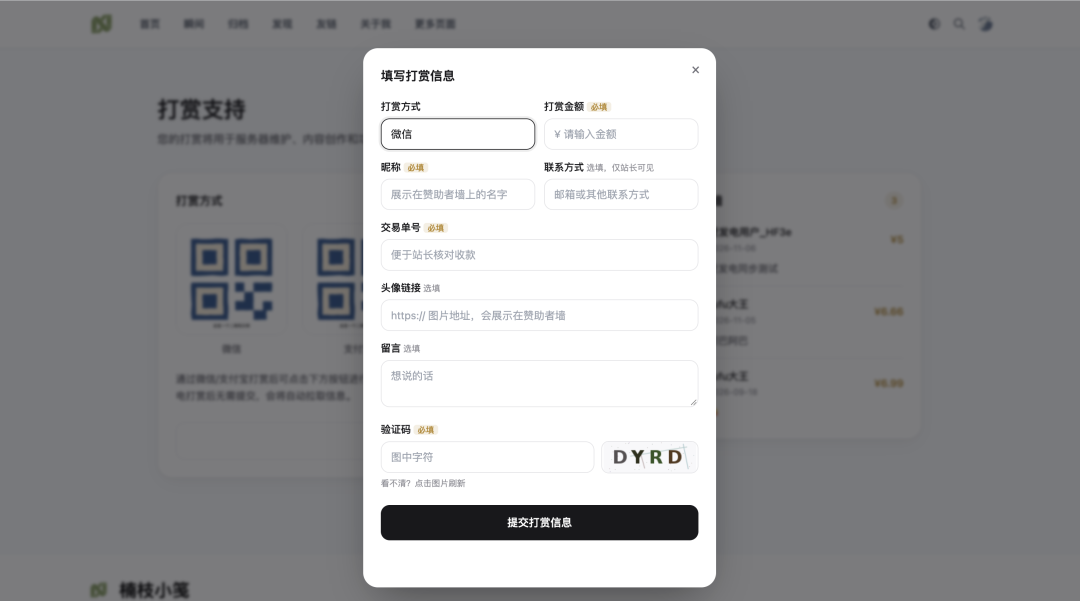
效果参考:
不想用片段时,也可以手动引入脚本后自己放按钮:
```html
```
任何带 `data-reward-open` 属性的元素点击时都会打开模态框,所以可以完全使用自己的按钮样式:
```html
```
也可以用 JS 主动控制:
```js
window.RewardModal.open(); // 打开
window.RewardModal.close(); // 关闭
```
模态框内的字段(打赏方式、金额、昵称、交易单号、头像、留言、联系方式、验证码)会**按插件设置自动显示或隐藏**,主题不需要做任何判断。
「仅登录用户可提交」开启且访客未登录时,模态框会禁用提交按钮并提示先登录;该判断依赖 `/public/config` 返回的 `loggedIn` 字段。
### 方式二:自建表单 + REST API
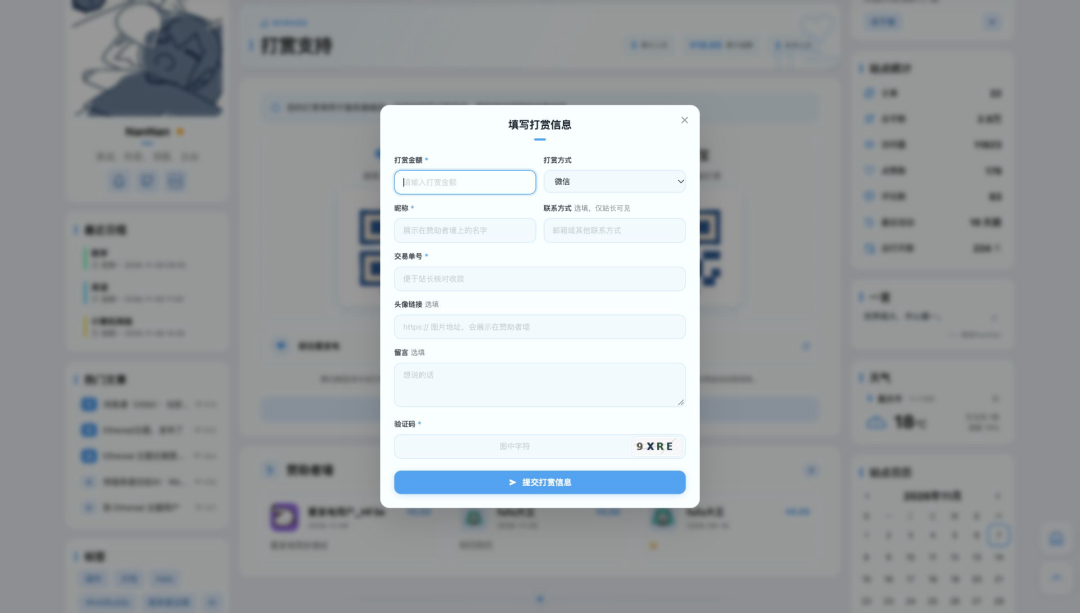
如果主题要完全自定义表单,需要自己调用公开接口(见 [REST API](/reward/rest-api.md))。适配效果参考:
```html
```
若插件开启了图形验证码,提交前还要先取一张验证码并把 `captchaId` / `captchaCode` 一并提交。
## Finder API
插件注册了名为 `rewardFinder` 的 Finder,可在**任意主题模板**里直接调用,无需注入、无需配置 Bean。返回的数据全部为服务端渲染,对 SEO 友好。
### 方法列表
| 方法 | 返回值 | 说明 |
| ---------------------- | ---------------------- | ------------------------- |
| `getConfig()` | `RewardConfigVo` | 页面配置,含标题、简介、二维码与爱发电地址、各开关 |
| `listWall(page, size)` | `ListResult` | 赞助者墙分页,`size` 上限 50 |
| `getStats()` | `RewardStatsVo` | 累计与本月统计,含金额 |
Finder 返回响应式类型,模板中用 `th:with` 绑定后即可当普通对象使用。
### RewardConfigVo
`getConfig()` 的返回值。
| 字段 | 类型 | 说明 |
| --------------------- | ------- | ------------------- |
| `title` | String | 页面标题 |
| `intro` | String | 页面简介 |
| `currencySymbol` | String | 货币符号 |
| `wechatQr` | String | 微信收款码地址,未配置时为 null |
| `alipayQr` | String | 支付宝收款码地址,未配置时为 null |
| `paymentTip` | String | 收款提示 |
| `afdianPageUrl` | String | 爱发电主页地址,未启用或未填写时为空串 |
| `enableRecordSubmit` | boolean | 是否允许访客提交 |
| `requireLogin` | boolean | 是否仅登录用户可提交 |
| `allowMessage` | boolean | 是否允许填写留言 |
| `wallEnabled` | boolean | 是否展示赞助者墙 |
| `enableCaptcha` | boolean | 是否要求填写图形验证码 |
| `enableTransactionNo` | boolean | 是否要求填写交易单号 |
| `enableAvatar` | boolean | 是否允许填写头像 |
### WallItem
`listWall()` 返回的分页结果中,`items` 的元素结构。只包含状态为「已确认」的记录。
| 字段 | 类型 | 说明 |
| ----------- | ---------- | ------------------------------------ |
| `nickname` | String | 昵称,未填写时为「匿名读者」 |
| `initial` | String | 昵称首个码点,供无头像时展示占位字(emoji 不会被截断) |
| `amount` | BigDecimal | 金额,关闭「墙面显示金额」时为 null |
| `avatar` | String | 头像地址,未填为 null |
| `message` | String | 留言,未填为 null |
| `createdAt` | String | 打赏日期,格式 `yyyy-MM-dd`;未填写打赏时间时为记录入库日期 |
### RewardStatsVo
| 字段 | 类型 | 说明 |
| ------------- | ---------- | ------ |
| `totalCount` | int | 累计支持人数 |
| `monthCount` | int | 本月支持人数 |
| `totalAmount` | BigDecimal | 累计金额 |
| `monthAmount` | BigDecimal | 本月金额 |
### 使用示例
**显示标题、简介与收款码**
```html
打赏支持
![微信收款码]()
![支付宝收款码]() ```
**显示赞助者墙(前 10 条)**
```html
-
![]() 张三
还没有公开的打赏记录
```
**显示统计**
```html
```
**分页取下一页**
```html
```
## 与主题配合的注意事项
- 插件停用时 `rewardFinder` 为空,模板里引用前先判断 `rewardFinder != null`,否则主题会抛模板异常
- 文章打赏弹窗的收款码、文案与爱发电地址都从 `getConfig()` 读取;主题侧不要再存一份
- 赞助者墙的金额显示受插件开关控制,主题不要自行补全金额
- 主题若在文章页提供打赏入口,可直接读取 `getConfig()` 渲染弹窗,打赏页链接固定指向 `/reward`
## 相关文档
- [REST API](/reward/rest-api.md):公开接口、请求响应示例、错误码
- [打赏记录与确认](/reward/records.md):状态与上墙规则